Getting started on EarnLab is pretty straightforward, but the way you set up your account matters. A lot of offer problems happen because of tracking issues, duplicate accounts, VPN use, or users starting tasks without reading the full requirements first. Before you chase higher-paying offers, take a few minutes to set up your account correctly.
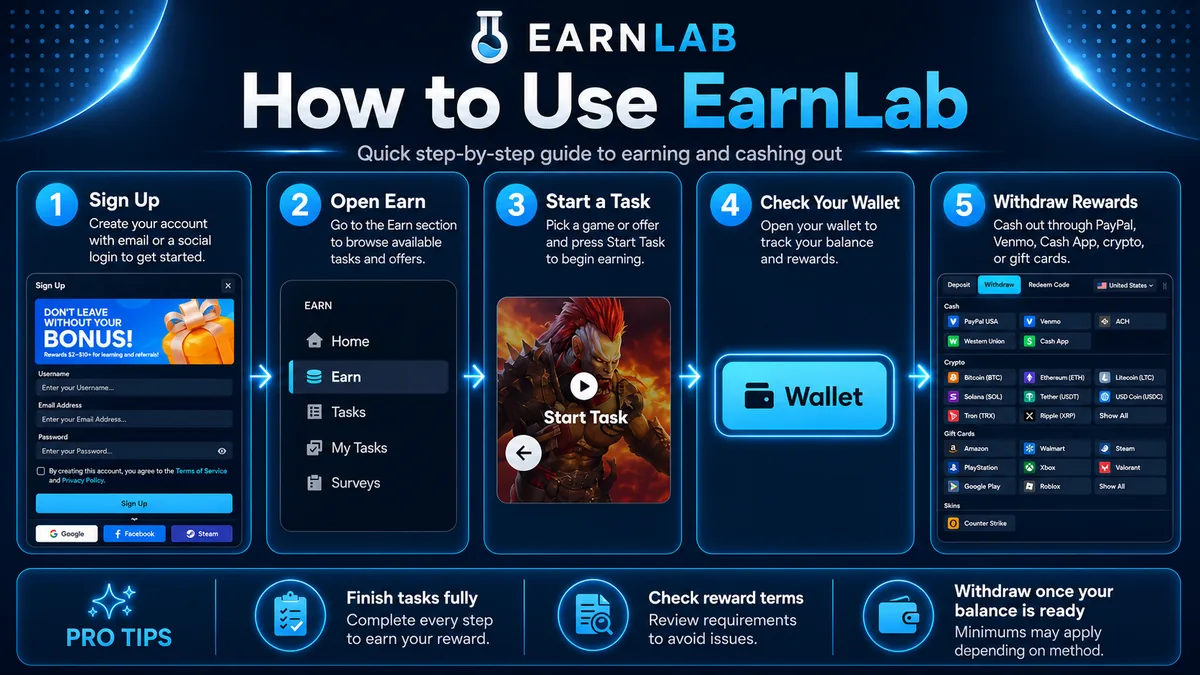
1. Sign Up for EarnLab
Start by creating an EarnLab account with accurate information. Use your real country, normal device, and consistent account details. I find it is usually best to sign up with a Google account because it can make logging in easier and may reduce account issues compared to using throwaway emails.
Only create one account. Avoid duplicate accounts, shared accounts, fake details, VPNs, proxies, emulators, or anything that makes your device or location look suspicious. These things can make tracking harder and may cause your account or rewards to be reviewed.
2. Complete Your Profile and KYC
After signing up, complete your profile as much as possible. Some offers, surveys, and withdrawal options may depend on your account information, country, device, and eligibility.
You should also complete KYC verification if EarnLab asks for it. KYC usually means verifying your identity before you can fully use the platform or cash out. While it may feel like an extra step, it can help reduce payment delays and make your account look more trustworthy when you start completing higher-value offers.
For the best results, do this early instead of waiting until you already have rewards pending.
3. Choose an Earning Method
EarnLab may offer several ways to earn, depending on your country and account. Common earning methods can include:
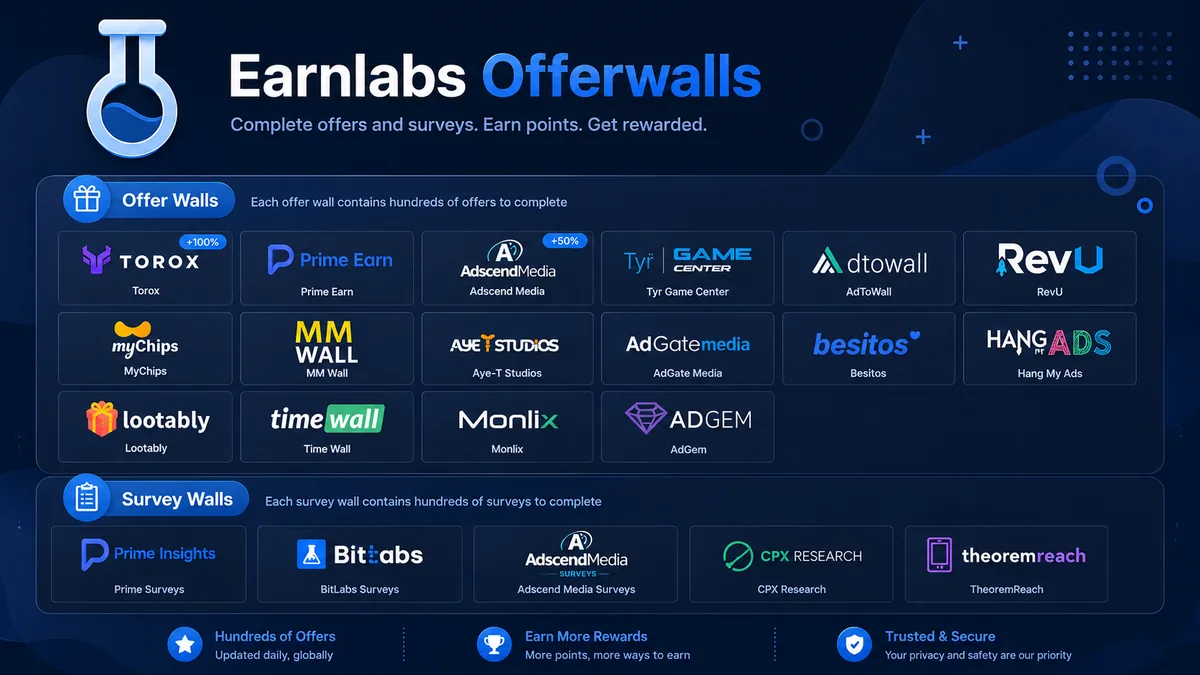
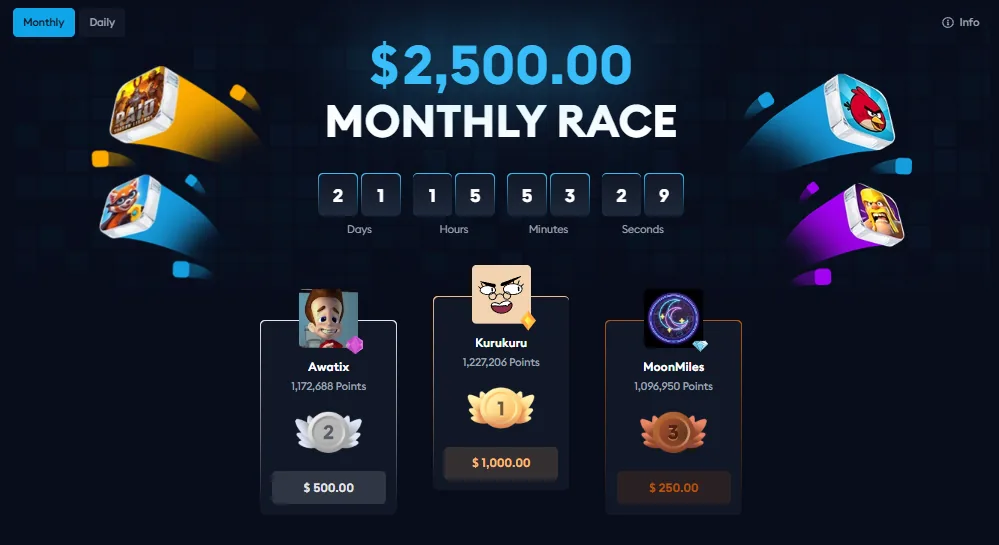
Surveys, apps, games, sign-up offers, offerwalls, referrals, streaks, missions, leaderboards, promos, and built-in gamified features.
For beginners, it is usually better to start with simple offers or surveys first so you can understand how tracking works. Higher-paying game and app offers can be worth it, but they usually require more time, stricter deadlines, and sometimes purchases.
4. Pick the Right Offer, Survey, App, Game, or Referral Task
Before starting anything, compare the reward to what the task actually requires. Do not only look at the payout number. Check the time limit, required device, country eligibility, purchase requirement, and whether you must be a new user for that app, game, or advertiser.
For example, a high-paying game offer may look good at first, but it may require reaching a difficult level within a short deadline. A lower-paying offer may be easier and more reliable if it matches your device and schedule.
5. Read the Requirements Before Starting
Always read the full requirements before clicking into an offer. Look for details such as:
Required level, milestone, deposit, subscription, purchase, ID verification, KYC, or several days of activity.
Some offers only credit after one specific milestone. Others have multiple tasks that pay separately. Some require you to install the app for the first time, make a purchase, keep activity for several days, or complete the task within a deadline.
This step is important because once you start through the tracked link, you may not be able to restart the offer cleanly if you make a mistake.
6. Complete the Task Through the Tracked Link
Most EarnLab offers depend on third-party tracking. That means you need to start from the correct EarnLab or offerwall link and stay consistent during the process.
Use the same device you started on, allow required tracking permissions, and avoid clearing cookies, switching browsers, changing devices, using private browsing, or turning on a VPN after you begin. For mobile game offers, make sure you install from the link provided and do not open the app from another source first.
If tracking breaks, the offerwall may not be able to confirm that you completed the task.
7. Wait for Tracking or Advertiser Review
Some offers credit quickly, but others may pend first. This is normal. Certain tasks need to be reviewed by the advertiser, the offerwall, or EarnLab before rewards are released.
Do not assume something is broken just because it does not credit instantly. Check the offer’s expected crediting time, pending rules, and support instructions. Some offers may take minutes, hours, or several days depending on the advertiser.
An offer can also be rejected if the advertiser decides the terms were not met, if tracking failed, or if the account activity looks suspicious.
8. Cash Out Once Eligible
Once your rewards are available and you meet the minimum withdrawal amount, you can cash out through the current withdrawal options on EarnLab.
Withdrawal methods and minimums can change, so always check the live withdrawal screen before relying on a specific cashout method. Do not assume that a payment option, minimum, or processing time will always stay the same.
Completing KYC, keeping your account clean, and avoiding risky behavior can help make cashing out smoother.
If an offer does not credit, use the correct support path. Sometimes that means contacting EarnLab support, and sometimes it means contacting the specific offerwall that hosted the task.
Include clear proof, such as screenshots of the offer, the task requirements, your completion screen, purchase receipt if there was one, account level, date completed, and any pending status. Explain exactly what did not credit and which milestone is missing.
The more organized your proof is, the easier it is for support to review your case.
Final Tip
The best way to use EarnLab is to treat every offer like a tracked task, not just a game or app download. Sign up cleanly, complete KYC when needed, read the rules, use the tracked link, and keep proof of your progress. This gives you the best chance of getting credited and avoiding problems when it is time to withdraw.
Important: Do not spend money on an offer unless the expected reward, time limit, terms, and risk make sense. Advanced offers can pay more, but they are also where tracking problems, missed deadlines, and negative ROI are most likely.
My simple rule: if an offer asks for money, a deposit, a subscription, or several days of grinding, slow down. Check if the same offer is on another wall, read the deadline twice, and make sure the payout is high enough to justify the risk. If it is a small app install or a short survey, you can be more casual. If it is a $100+ game offer, treat it like a project.