Payouts
Raid: Shadow Legends Milestone Breakdown
These payouts and time windows represent the full verified task chain. Review each tier before starting to map out your optimal stop point.
| Task | Points | USD Payout | Deadline | Safer Read |
|---|---|---|---|---|
| Register and start playing the game | 370 | $0.370 | No specific deadline in task row | Tracking test |
| Complete the tutorial | 37 | $0.037 | No specific deadline in task row | Finish before spending |
| Fight 20 Battles within 24 Hours | 89 | $0.089 | within 24 Hours | Day-one proof task |
| Reach level 15 within 3 Days | 111 | $0.111 | within 3 Days | Screenshot account/profile level |
| Upgrade a hero to 5 stars within 3 days | 185 | $0.185 | within 3 days | Early Tavern/rank pressure |
| Make any purchase. Can be repeated daily (1 time per 24 hours) | 2,220 | $2.220 | Can be repeated daily (1 time per 24 hours) | Buy only after early tracking works |
| Purchase Silver 500k pack for $9.99 | 11,100 | $11.100 | No specific deadline in task row | Exact named pack only |
| Purchase the Daily Gem Pack for $9.99 | 11,100 | $11.100 | No specific deadline in task row | Exact named pack only |
| Reach Level 30 Within 4 Days | 444 | $0.444 | Within 4 Days | Tight early level task |
| Upgrade 3 heroes to 5 stars within 5 Days | 740 | $0.740 | within 5 Days | Resource-heavy |
| Upgrade a hero to 6 stars within 10 Days | 1,110 | $1.110 | within 10 Days | Major rank-up bottleneck |
| Upgrade 5 heroes to 5 stars within 14 Days | 1,850 | $1.850 | within 14 Days | Can compete with 6-star food needs |
| Purchase a Sacred Daily Pack for $29.99 | 25,900 | $25.900 | No specific deadline in task row | High-value review risk |
| Purchase the Beginner Progress Pack for $49.99 (Eligible only if purchased after Day 7) | 44,400 | $44.400 | Eligible only if purchased after Day 7 | Do not buy early |
| Purchase Box of Gems for $29.99 (Eligible only if purchased after Day 30) | 37,000 | $37.000 | Eligible only if purchased after Day 30 | Verify the offer is still active |
| Open 2 Sacred (Yellow) Shards | 2,220 | $2.220 | No specific deadline in task row | Portal task |
| Upgrade 3 heroes to 6 stars within 21 Days | 5,920 | $5.920 | within 21 Days | Very high resource task |
| Open 4 Sacred (Yellow) Shards | 5,920 | $5.920 | No specific deadline in task row | Continue only after earlier shard credit |
| Reach Level 50 within 21 days | 14,800 | $14.800 | within 21 days | Late grind |
| Open 6 Sacred (Yellow) Shards | 16,280 | $16.280 | No specific deadline in task row | Expensive or slow if short on Shards |
| Open 8 Sacred (Yellow) Shards | 28,120 | $28.120 | No specific deadline in task row | Highest shard tier |
| Reach Level 60 within 35 days | 37,000 | $37.000 | within 35 days | Stretch goal |
| Reach Level 70 within 60 days | 125,800 | $125.800 | within 60 days | Largest payout and highest grind risk |
Setup
Android Setup & Anti-Fraud Tracking Checks
Start from the offerwall click on the exact Android device you will keep using. This offer requires a clean install where Raid has never been installed before.
Always use a physical device. Offerwalls prohibit VPN, VPS, and emulator use; multi-accounting leads to instant payment forfeits. Many online Raid guides suggest BlueStacks or PC clients, but doing so on an Android offer will break tracking.
Confirm early tasks track before spending a single dollar. Complete the tutorial, finish 20 battles within 24 hours, and verify that the offerwall shows credited or pending status before considering purchase tiers.
Game basics
Core Raid Systems That Drive Offer Credit
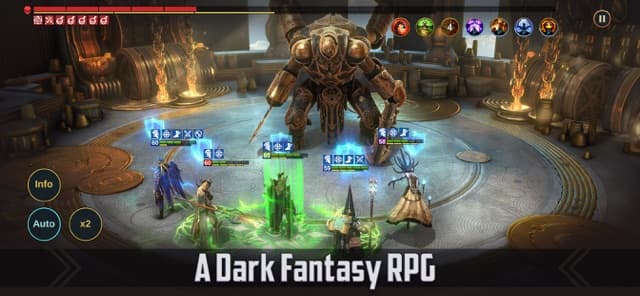
You don't need to master deep PvP meta to complete this offer. Focus strictly on Campaign progression, Tavern rank upgrades, and Sacred Shards.
For this offer, repeated battles yield XP and account levels. The Tavern is the bottleneck for hero rank upgrades, and the Summoning Portal is where Sacred Shards are redeemed.
Keep strict tabs on account level vs hero level. Milestone tasks referencing "Level 15, 30, 50, 60, 70" refer to your player profile level, not individual champion levels.

Systems
Campaign, Tavern, Sacred Shards & Purchases
Campaign, Battles, and Multi-Battle
Use the opening Campaign and normal early battles for the 20-battle task, early account progress, XP, Silver, and general growth.
Plarium support says Multi-Battle can run repeated Campaign or Dungeon battles after a stage has been beaten manually or on Auto. It also says Campaign and Dungeons have 30 free Multi-Battle attempts per day.
Multi-Battle result screens can be useful proof because they can show completed battle count, XP, Silver, Energy, Gems, and rewards.
Tavern, Champion Rank, and Star Tasks
The Tavern unlocks at Level 6 and lets players level Champions, upgrade Champion Rank, upgrade skills, and Ascend Champions.
Plarium support lists rank caps as Rank 1 level 10, Rank 2 level 20, Rank 3 level 30, Rank 4 level 40, Rank 5 level 50, and Rank 6 level 60.
Upgrading Champion Rank requires same-rank Champions or Chickens, and moving to Rank 6 needs five Rank 5 Champions or Chickens. That is why the 5-star and 6-star tasks are resource walls.
Sacred Shards and the Portal
The offer tasks are opening Sacred Yellow Shards, not pulling a specific Champion.
Plarium support says players should check the Portal event state before opening Shards if they care about event timing. That is separate from the Gain.gg requirement.
Opening Shards is irreversible, so screenshot your Sacred Shard count before opening, the Portal results, and the Gain.gg task status afterward.
Purchases and Receipts
Raid has in-app purchases, and Google Play warns that some paid items may not be refundable depending on item type.
For Android purchase problems, Plarium support recommends checking stable internet, the correct Google Account, card and address details, Google Play cache, and pending transactions.
For this offer, exact pack matching matters. Do not treat any $9.99 purchase as the same as the Silver 500k pack or Daily Gem Pack unless the live offerwall explicitly says substitutes count.
Worth it
Complete-or-Skip Filter (ROI Matrix)
The offer is high-value if you execute the sweet-spot tiers and stop before excessive grinding.
| Task Group | Best Use | Main Risk | Verdict |
|---|---|---|---|
| Register, tutorial, 20 battles, Level 15 | Tracking test | Low payout, strict early timing on battles and Level 15 | Do these first |
| Level 30 and early 5-star tasks | Early progress check | Tight 3-5 day windows | Try if early tracking works |
| Any purchase and $9.99 named packs | Small spend test | Purchase may not stack, review risk, non-refund risk | Only after no-spend tasks track |
| $29.99 and $49.99 purchase tasks | Higher point value | Exact pack availability, timing gates, held offer review | Only with clear proof and budget |
| 5-star and 6-star hero chains | Shows serious progress | Food and Chicken bottleneck | High effort |
| Sacred Shard tiers | Can add value if you already have Shards | Shards may require spend or long progression | Do not chase blindly |
| Level 50, 60, 70 | Biggest level payouts | Time-heavy late grind | Treat Level 70 as a stretch goal |
Task route
Milestone Progression Strategy
Phase 1: Early Tasks
Register and start playing the game
Screenshot the Gain.gg offer row, Google Play install page, first app open, and first account/profile screen. Keep the same Android device and do not use a VPN, VPS, or emulator.
Complete the tutorial
Finish the opening sequence before spending. Screenshot the first hub or profile/account screen after the tutorial.
Fight 20 Battles within 24 Hours
Use Campaign battles and Auto/Multi-Battle only after you have unlocked and cleared eligible stages. Capture battle result screens inside the first day.
Reach level 15 within 3 Days
Treat this as an account/profile level task unless the live Gain.gg wall defines it differently. Screenshot the visible level screen.
Upgrade a hero to 5 stars within 3 days
Use the Tavern and preserve rank-up materials. A Champion detail screen showing 5 stars is the cleanest proof.
Reach Level 30 Within 4 Days
Keep pushing Campaign and early activities, then screenshot account/profile Level 30 immediately.
Upgrade 3 heroes to 5 stars within 5 Days
Repeat the Tavern rank-up loop for three Champions and keep individual or roster proof for all three.
Phase 2: Purchase Tasks
Make any purchase. Can be repeated daily (1 time per 24 hours)
Do not expect repeated credit from several purchases inside the same 24-hour period. Capture the task row, in-game purchase screen, Google Play receipt, and Gain.gg activity status.
Purchase Silver 500k pack for $9.99
Find the exact Silver 500k pack. Keep a screenshot where both the pack name and price are visible.
Purchase the Daily Gem Pack for $9.99
Buy only the exact Daily Gem Pack if you choose to attempt it, and keep proof separate from any other $9.99 transaction.
Purchase a Sacred Daily Pack for $29.99
Confirm the exact pack name and $29.99 price before buying. Treat it as higher risk because the point value is larger and the task row does not include a deadline.
Purchase the Beginner Progress Pack for $49.99 (Eligible only if purchased after Day 7)
Do not buy before Day 7. Keep proof of the task row, purchase date, pack name, price, and receipt.
Purchase Box of Gems for $29.99 (Eligible only if purchased after Day 30)
Verify that the offer is still active and visible after Day 30 before buying. Skip this if earlier tasks have not credited cleanly.
Phase 4: Hero Rank & Late Level Milestones
Upgrade a hero to 6 stars within 10 Days
A 6-star Champion means Rank 6, which requires five Rank 5 Champions or Chickens. Treat this as a major resource bottleneck.
Upgrade 5 heroes to 5 stars within 14 Days
Track each finished 5-star Champion so proof is not ambiguous. This can conflict with using 5-star food for a 6-star upgrade.
Upgrade 3 heroes to 6 stars within 21 Days
Plan this only if you are already producing enough Rank 5 food. Three 6-star Champions repeat the Rank 6 requirement multiple times.
Reach Level 50 within 21 days
Screenshot the profile/account level as soon as you hit 50. This is a more serious grind than Level 15 or 30.
Reach Level 60 within 35 days
Decide based on your actual pace. If you are far from Level 60 by the midpoint, do not let the payout push you into bad purchases.
Reach Level 70 within 60 days
Treat this as the stretch task. It pays 125,800 points, but that does not make it easy or guaranteed.
Proof
Screenshot Evidence Checklist
| Task Family | Required Proof Screenshots |
|---|---|
| Install and start | Gain.gg offer page, task list, Google Play page, install/open screen, first profile/account screen |
| Tutorial | Post-tutorial hub, account/profile screen |
| Battles | Battle result screens, Multi-Battle result screen, date/time if possible |
| Level milestones | Profile/account level screen at 15, 30, 50, 60, and 70 |
| Champion stars | Champion detail screen showing 5 or 6 stars, roster screen with multiple completed Champions |
| Purchases | Task row, exact pack screen, Google Play receipt, inventory change, Gain.gg status |
| Sacred Shards | Shard inventory before opening, Portal result screens, Gain.gg status after opening |
| Support | Credited, pending, held, or missing status; ticket ID; all receipts and screenshots |
Support
How to Resolve Untracked Milestones
High-value payment tiers often trigger review holds. If an offer does not credit within the specified window, file a claim through the offerwall provider ticket system rather than the game developer.
- Confirm your offer history status (pending vs missing).
- Wait the standard 24–48h verification period before submitting a claim.
- Open a ticket directly from the offerwall dashboard.
- Submit your User ID, milestone screenshot, and Google Play receipt.
- Keep your ticket ID saved and do not re-attempt the task on another device.
FAQ
Frequently Asked Questions
Is the Raid: Shadow Legends Gain.gg offer worth doing?
It can be worth testing because the task list totals 361,695 points, but it is high-risk as a full completion attempt. Do the no-spend tasks first. Consider purchases only after early tasks track, and treat Level 60, Level 70, 8 Sacred Shards, and multiple 6-star Champions as stretch goals.
Should I buy Raid packs before early tasks credit?
No. Finish the install, tutorial, 20 battles, and early level tasks first. Purchases can be reviewed, held, or non-refundable, and a named pack task should be attempted only with exact pack proof.
Do I need an emulator or PC to complete the Android offer?
No. This is an Android offer for the target user, and Gain.gg prohibits VPN, VPS, and emulator use. Stay on the Android device used for the offer click and install.
Are the Sacred Shard tasks about opening Shards or pulling a Legendary?
The task text says to open Sacred Yellow Shards. It does not say you must pull a Legendary. Screenshot your inventory before opening and the Portal results after opening.
What should I do if a Raid task does not credit?
Check Gain.gg activity first. If it is pending or held, keep your proof. If it is missing, use the offerwall provider support path and submit the exact task text, screenshots, dates, and receipts.
Lock In Payouts
Compare Current Live Raid Rates
Rates fluctuate weekly between offerwalls. Always compare active rates on EarnGrind before starting your 30-day grind.